

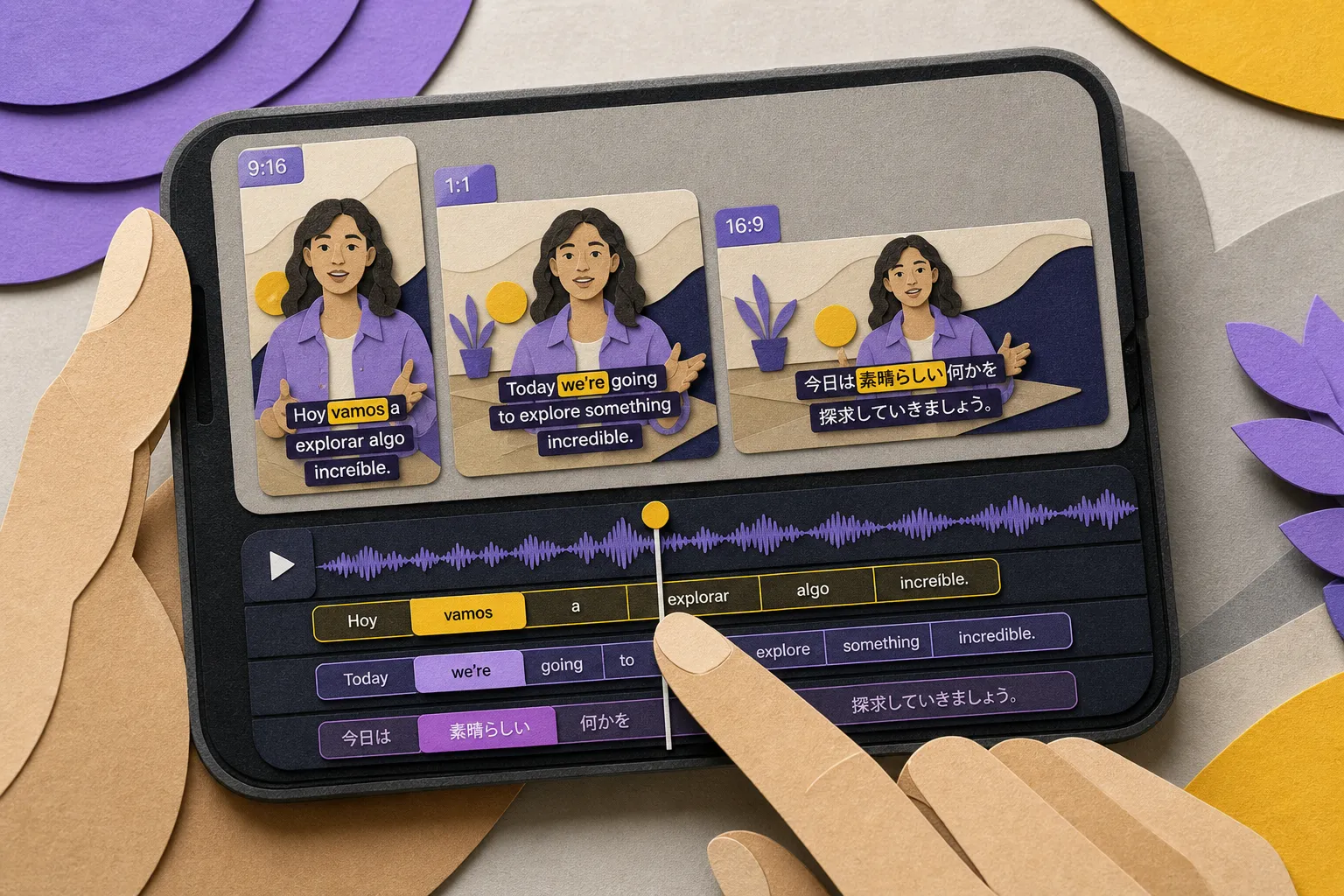
Publishing one video in a dozen languages next week is realistic if your captions are set up right. Translation tools are fast, but they mirror whatever you feed them. Start with a clean source, define style rules once, and lock timing that people can actually read on a phone. Use this checklist to keep multilingual captions clear, on-brand, and ready for social export without a round of late fixes.
Prep your source text before you auto translate captions
- Lock a clean source script. Remove ums, stutters, and side tangents. Fix grammar and punctuation, and pick a spelling standard (US vs UK) so mistakes do not multiply across locales. Add missing subjects and implied words that the ear catches but a translator will not.
- Expand acronyms and tough terms once. Spell out the first mention (for example, machine learning instead of ML) and add a short glossary for product names and UI strings that must stay in the source language. Mark non-translatable items clearly so reviewers see intent.
- Segment for sense, not for the clock. Keep 1–2 lines per subtitle and break at natural phrase boundaries. Avoid splitting names, verbs from objects, or prepositions from their nouns. Better segmentation makes machine output smoother and reduces human re-edits.
- Set line and reading speed targets. Define targets before timing: Latin scripts 35-42 characters per line and 14-17 characters per second; CJK 13-17 characters per line and 7-11 characters per second. Minimum on-screen time 1.0 s, maximum 6.0 s. These guardrails inform every locale.
- Generate the base subtitles with AI. Use AI Subtitles to create the source captions, then fix names, domain terms, and punctuation. Turn on automatic casing and numbers if available, and make a fast pass for homophones that ASR often misses.
- Standardize casing and numbers. Decide on sentence case or title case for captions. Set rules for times (24-hour vs 12-hour), dates (YYYY-MM-DD vs DD/MM/YYYY), decimals (dot vs comma), and whether to write out numbers under 10. Consistency here saves every market from guesswork.
- Collect on-screen text and signs. List any visible UI labels, charts, and signage that need subtitling. Note if you will translate on-screen text, replace it with overlays, or keep it and add a parenthetical in the caption.
- Bring in social copy without typos. If you are turning X threads into captions, X-Post-Copier can grab post text and links so you avoid retyping, stray emoji, and broken URLs. Decide how to handle hashtags (#stay) and emoji (remove or keep) before translation begins.
Locale and style consistency across 10+ markets
- Pick specific locales, not just languages. Spanish (Spain) vs Spanish (Mexico) changes tone and vocabulary (ordenador vs computadora, tú vs usted). French (France) vs French (Canada), and Portuguese (Portugal) vs Portuguese (Brazil) have similar splits. Lock the target locale for each market up front.
- Set formality and voice rules. Define you vs usted/voi/vosotros and when to switch. Note if slang is allowed, if idioms should be localized or flattened to plain meaning, and how to handle second-person imperatives in UI copy.
- Fix number, date, and unit formats. Thousand and decimal separators differ (1,234.56 vs 1 234,56). Date order changes (MM/DD/YYYY vs DD.MM.YYYY). Decide on currency placement (€ 1 234,56 vs $1,234.56) and units (imperial vs metric) per locale so captions look native.
- Protect brand names and UI terms. Flag product names, feature labels, and button text that must stay as-is. If transliteration is allowed in non-Latin scripts, choose one spelling and stick to it across videos.
- Use one visual style across locales. In Subtitle Style Customization, pick fonts, colors, and animations that support all target scripts. Test a line in each script, then save a preset so every language looks like the same brand.
- Plan for text expansion. Expect 15-35% growth from English into German, Russian, or Arabic. Keep font size modest, allow two lines when needed, and give captions enough time on screen so you do not force micro text.
- Stay consistent with karaoke effects. If you use Karaoke Style Subtitles or Karaoke Style Captions, keep one highlight color, weight, and pacing. Languages map words to syllables differently, so sync by spoken word, not by character count.
- Mind font fallbacks. Ensure your primary font covers accents and scripts like Cyrillic, Arabic, and CJK. If not, set a readable fallback that keeps similar weight, x-height, and letter spacing so the style does not jump between glyphs.
- Keep style packs reusable. If you often add subtitles to video online, save presets for font, line height, background box, shadow, and stroke. Document safe areas and placement so editors do not reinvent the look per locale.
Timing, reading speed, and layout checks
- Check characters per line by script. Latin 35-42 CPL, Cyrillic 32-38, Arabic 25-35, CJK 13-17. On small phones, favor the lower end. If a line overruns, rephrase or split at a natural pause instead of shrinking the font.
- Keep reading speed humane. Target 14-17 CPS for Latin scripts and 7-11 CPS for CJK. Set minimum display to 1.0 s and maximum to 6.0 s, with a small gap between cues. If a language expands, lengthen on-screen time rather than compressing type.
- Break lines at phrase boundaries. Good: We shipped the update | yesterday. Bad: We shipped the | update yesterday. Proper breaks feel native in translation and help karaoke subtitles sync cleanly.
- Sync highlights to words if singing or callouts matter. When using word-level highlighting, nudge timings so each highlight lands on the spoken beat. Prioritize spoken words over music hits to avoid jitter.
- Retime on a simple timeline. Use Timeline Editing to trim, split, and nudge captions without drifting from the audio waveform. Sanity check for overlaps, orphaned single-word lines, and cues that flash faster than your minimum duration.
- Test platform layouts. With Change Aspect Ratio, review 9:16 for TikTok, 1:1 for Instagram, and 16:9 for YouTube. Keep captions inside safe areas and away from native UI chrome, progress bars, or lower-thirds.
- Avoid stack-ups with on-screen graphics. If lower-thirds, product labels, or callouts appear, move captions to the opposite band or delay a cue by a beat. Do not let type sit over type.
- Decide on platform strategy. Auto captions on TikTok and YouTube miss names and jargon. Burned-in versions give you control over accuracy, style, and placement, and they look the same everywhere.
Translation QA and sign-off
- Create first drafts fast, then edit. Use Translate Subtitles for initial versions, then assign a bilingual reviewer for each locale to fix tone, grammar, and domain terms. A quick human pass beats perfecting the machine output in the first round.
- Spot-check tricky lines with back-translation. For legal, medical, or safety-critical sentences, do a reverse translation to confirm the meaning. Use this sparingly so review time goes where risk is highest.
- Watch for idioms and false friends. Replace sayings that do not carry over and avoid lookalike traps (actually/aktuell, embarrassed/embarazada, gift/Gift in German). Plain meaning is better than a broken metaphor.
- Keep names and trademarks consistent. Do not translate protected names. If a transliteration is standard in a market, document it and use it across all videos. Confirm capitalization and spacing with the brand team.
- Align punctuation and quotes to local norms. French often uses « guillemets », Spanish uses opening ¿ and ¡, Arabic flips the question mark (؟). Adjust spacing around punctuation so text feels native, not machine-made.
- Check sensitive or regulated terms. In health, finance, or education, verify that wording matches local expectations and compliance notes. If in doubt, replace claims with descriptive language a reviewer can approve quickly.
Final review with native readers and export
- Do a native-language pass with audio on. Ask one native per locale to watch at normal speed and flag anything that feels rushed, unclear, or off-tone. Fix mis-timed cues first, then wording.
- Test on real devices. Play on a small phone and a large screen to check legibility, line breaks, and cut changes. Aim for high contrast and a stroke or box that survives bright footage.
- Export controlled copies for sharing. Use Burned-In Subtitles when you need exact styling on social feeds, and export separate SRT or VTT files for platforms that support toggling captions. Name files with locale codes (for example, es-MX, fr-CA) so review stays tidy.
- Check music against dialogue. If you Add Music, keep vocals below dialogue and duck background tracks under dense caption sections. Prioritize intelligibility over loudness.
- Prep platform-specific versions. Create aspect-ratio variants per channel. A 9:16 cut might need tighter CPL and a higher vertical offset than a 16:9 upload to avoid UI overlays.
- Make a simple, local-friendly thumbnail. With AI Thumbnail Generator, pick imagery that still reads when captions are on screen. Avoid text-heavy designs that will sit under the subtitle area.
- Archive source and final files. Save the original transcript, a per-locale glossary, subtitle files, and the approved burn-ins. Version them so updates never start from scratch.
If you work with music videos or fast-paced explainers, an animated karaoke subtitles editor can make each line pop, but the same quality rules still apply. Keep timing human, style unified, and wording native. That is how auto translation scales without dulling your message.
Key takeaways
- Clean source captions make every downstream translation better and faster to review.
- Decide locale targets, tone, and style once, then reuse the same visual preset across languages.
- Check timing and reading speed per script, not just per video.
- Machine-first, human-finished translation is the fastest path to quality at scale.
- When accuracy and style matter, burn subtitles into video for full control on social.
Set this checklist as your team’s standard and multilingual captioning becomes repeatable instead of a scramble before launch.