

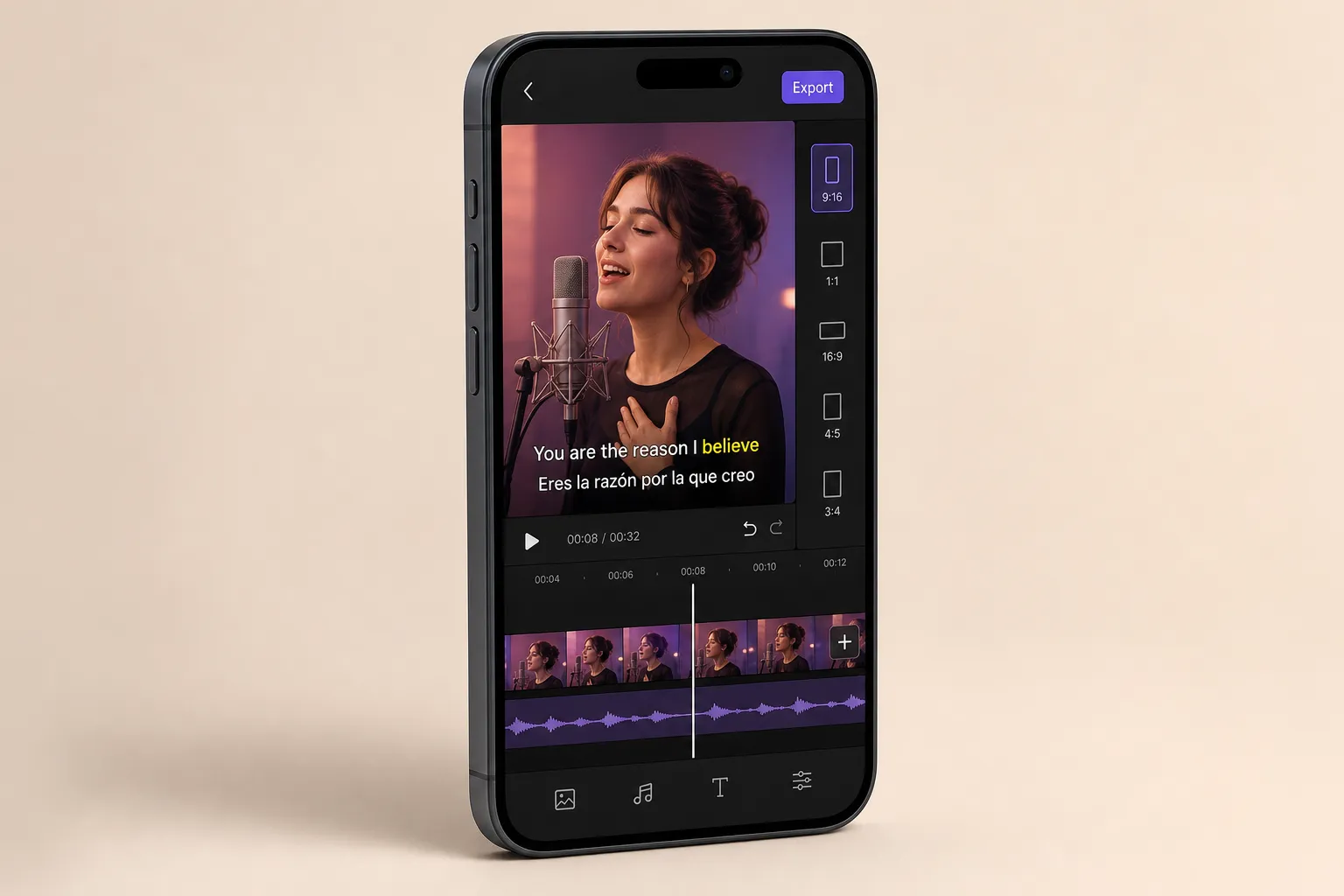
If translating captions keeps wrecking your timing or stripping your brand look, there is a cleaner way. With SubtitlesFast, you can translate subtitles online, keep your edits and styling, and export burned-in captions that look the same everywhere.
Here is a simple workflow that preserves timing, fonts, colors, and animations while you switch languages. You will finish with platform-ready videos for TikTok, YouTube, Instagram, and X.
Get clean source captions
Accurate, well-timed source captions make every translation faster to review and easier to read.
- Create AI Subtitles from your video. Upload your video to SubtitlesFast and run AI Subtitles. It transcribes in 50+ languages and shows word-level highlighting for quick spot checks.
- Fix names and brand terms. Correct product names, acronyms, and jargon now so they do not proliferate across languages. Keep a mini glossary in your project notes.
- Keep lines scannable. Aim for 1 - 2 lines, roughly 35 - 42 characters per line. Break on natural phrase boundaries and punctuation. Avoid three-line stacks.
- Stabilize timing. In Timeline Editing, nudge start and end points so each subtitle lands on a beat or sentence end. As a rule of thumb, keep each subtitle on screen for 1.0 - 6.0 seconds. Very short bursts are hard to read.
- Pick a base style early. Choose a readable preset in Subtitle Style Customization so font, size, color, and placement are consistent before translation expands or contracts text.
AI can also speed up other repetitive tasks. If you are hunting for a job, services that scan openings and draft materials help you focus on the final edit. This writeup, Jobs in Montego Bay: Where to Find Openings Right Now, shows a workflow with alerts plus an AI resume builder that drafts tailored resumes and cover letters.
Translate without breaking timing
With clean captions, you can switch languages while keeping the original timecodes intact.
- One-click translation. Use Translate Subtitles to generate your target language. SubtitlesFast preserves segment timecodes, so nothing drifts on the timeline.
- Edit for meaning, not literalness. Replace word-for-word output with what a native viewer would actually say. Check idioms, slang, cultural references, and tone (formal vs informal).
- Watch read speed and expansion. Many languages expand. Expect roughly +15 - 25% for Spanish and French and up to +35% for German. If a line feels rushed, split the segment on the timeline, shorten nonessential words, or move a clause to the next subtitle.
- Mind punctuation and capitalization rules. Different languages prefer different spacing and quote marks. Clean punctuation improves line breaks and readability.
- Respect names and numbers. Keep proper nouns consistent. Localize numbers, dates, and currency formats where it helps clarity.
- Music and lyrics. For songs or chants, align subtitles to phrases, not syllables, unless you plan to add karaoke highlights in the next step.
Keep fonts, colors, and animations
Translation should not flatten your design. Lock styling so every language looks like your brand.
- Use fonts with full character support. Verify that your font covers the target script. If glyphs are missing for Cyrillic, Greek, Vietnamese accents, or CJK characters, switch to a supported option in Subtitle Style Customization (fonts like Inter, Noto Sans, or Source Sans 3 have broad coverage).
- Protect contrast and legibility. Keep text against backgrounds at a strong contrast. Add a soft shadow, 2 - 4 px outline, or a semi-opaque box for busy footage. Slightly increase line spacing (120 - 140%) for dense scripts.
- Keep motion purposeful. Pick from the animated styles in SubtitlesFast, but keep movement subtle. Quick fades and short slides help the eye more than heavy effects, especially in fast cuts.
Karaoke highlights when timing matters
- Karaoke Style Subtitles. Turn on karaoke style captions to highlight words or phrases as they are spoken or sung. This works well for lyrics, hooks, and key callouts.
- Practical settings. Use a high-contrast highlight color that complements your base text. Keep highlights tight to the beat and avoid long, multi-clause spans in a single highlight.
Format for platforms and export
Match the aspect ratio and safe zones of the destination platform, then export once.
- Set the aspect ratio. Use Change Aspect Ratio to switch to 9:16 for TikTok and Reels, 1:1 for Instagram feed, or 16:9 for YouTube. After resizing, re-check subtitle placement so it clears UI chrome and lower thirds.
- Place captions inside safe areas. Keep text away from TikTok’s right-hand icon column and YouTube’s progress bar. Test on your phone at arm’s length to catch tiny fonts or edge clipping.
- Add music if it helps. For teasers or silent b-roll, use Add Music in the editor. Keep music below dialog so captions remain optional, not a crutch.
- Generate a matching cover. Use the AI Thumbnail Generator so your translated title and imagery fit the platform’s vibe.
- Burn subtitles into video. Finish with Burned-In Subtitles so styling and placement are identical for every viewer. Sidecar files like SRT are great for archives, but social apps often ignore custom styling.
Note on auto captions. TikTok and YouTube can auto-caption, but you lose control of fonts, placement, and effects. If brand consistency or karaoke highlights matter, burn your captions into the video.
Common pitfalls and quick fixes
- Timing feels rushed after translation. Split the segment along a natural pause, or trim filler words in the target language. Keep each subtitle on screen long enough for a comfortable read.
- Unreadable styles on small screens. Thin scripts and heavy shadows break on 9:16. Bump font size, add a soft outline, and increase line spacing slightly. Test on a phone.
- Inconsistent styling across languages. Save a reusable preset in Subtitle Style Customization and apply it before translating so every version matches your baseline.
- Overusing karaoke effects. Reserve karaoke highlights for lyrics, hooks, and quotes. Too much highlighting turns into noise.
- Forgetting safe zones after resizing. After Change Aspect Ratio, scrub through the cut and check corners and the right-hand rail on vertical formats.
Key takeaways
- Clean, well-timed source captions translate faster and read better.
- Translate subtitles online, then fix meaning and read speed, not just words.
- Use fonts that support your target script and keep contrast high.
- Burned-in subtitles preserve brand styling across social platforms.
- Karaoke highlights help with music, hooks, and timed callouts.
FAQ
How do I keep subtitle timing when I translate into a longer language?
Translate first, then review read speed. Split long lines on the timeline or trim wording while preserving meaning so each segment stays readable.
Can I keep my fonts, colors, and animations after translation?
Yes. Set your look in Subtitle Style Customization before translating. SubtitlesFast carries that styling across languages so you do not rebuild designs.
Do I need burned-in subtitles for TikTok and YouTube?
If you want full styling control, yes. Burned-in subtitles keep your brand look and karaoke highlights consistent across uploads and devices.
Can I add karaoke style captions in other languages?
Yes. Use Karaoke Style Subtitles to highlight words or phrases in sync, then check tempo and phrasing so highlights follow the beat naturally.
What if my font does not support the target language?
Switch to a font with full character coverage inside Subtitle Style Customization. Test a few lines to confirm accents and special characters render cleanly.