

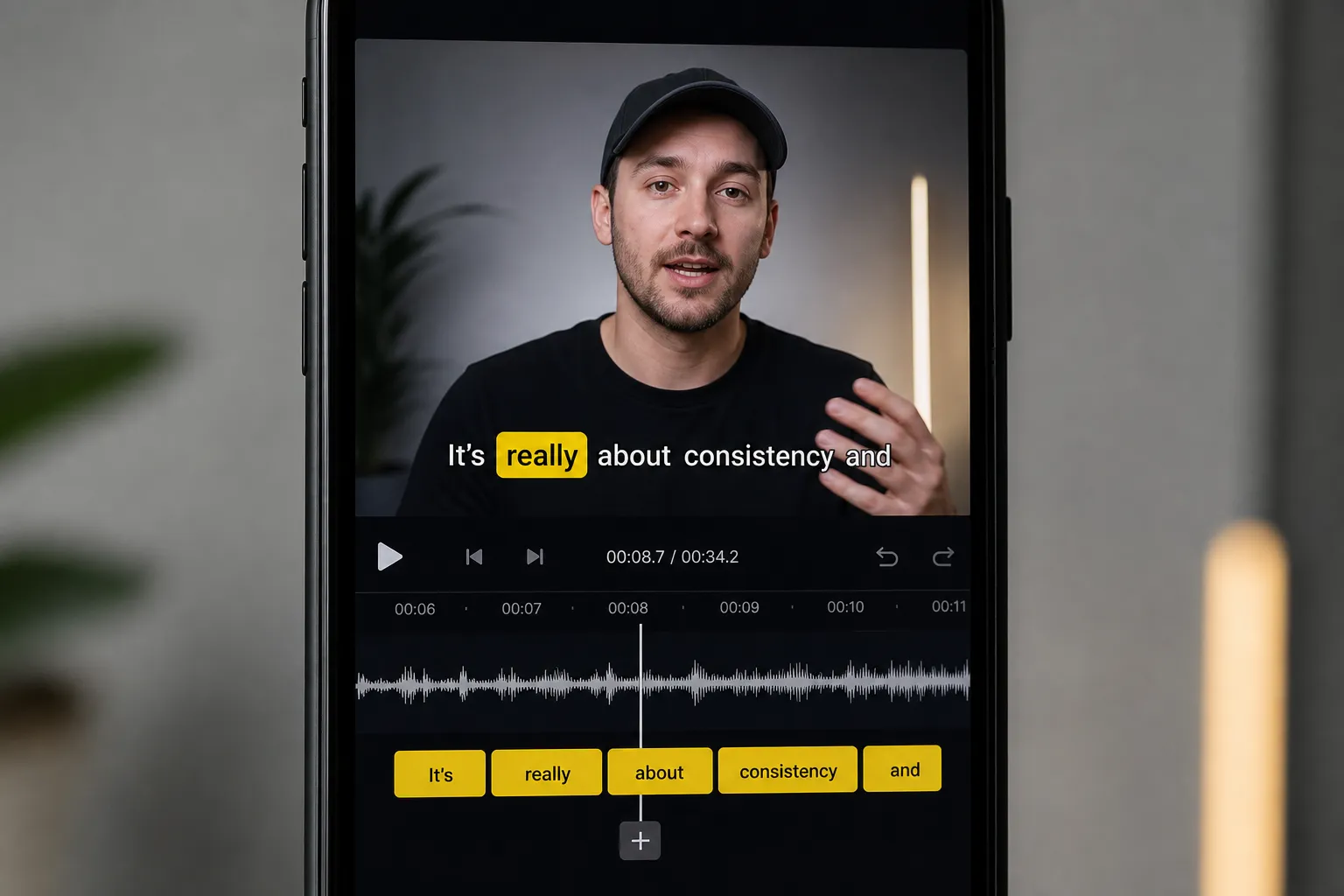
Most people meet your video on mute. If the first second is just a face moving with no words, they keep scrolling. If that same second has clean, readable captions that match the voice, you buy an extra beat to hook them, and you give platforms more text to rank.
Here is a practical plan to turn captions into a discovery and retention lift. It is simple to test, fast to repeat, and friendly to short-form and long-form alike.
Make captions that search and feeds can read
Captions help platforms understand topic and entities. They also help viewers stick around when audio is off. Get these parts right first:
- Caption every upload. Use an ai subtitles generator to add subtitles to video online for shorts, clips, and long-form. Skipping captions is leaving search context on the table.
- Aim for 95%+ accuracy. Fix names, brands, jargon, URLs, and numbers. If your host says “iPhone 15 camera settings” or “NYC bagel tour,” keep that exact phrasing. That is query language your audience already types.
- Keep it natural, not stuffed. Do not force keywords your speaker did not say. Awkward wording hurts watch time, and choppy captions turn people off.
- Ship both ways when it helps. Upload an SRT/VTT for YouTube long-form so desktop users can toggle captions. Burn subtitles into video for Shorts, Reels, TikTok, and X so your look always shows up.
Small detail, big impact: use sentence case, proper punctuation, and consistent speaker labels. Clean text earns trust and makes your transcript usable as a blog or description later.
Make words easy to read at a glance
Readable captions follow a few simple rules:
- Lines and length: show 1–2 lines, 32–42 characters per line. Short lines scan fast on small screens.
- Timing: target 16–20 characters per second, 1.5–6.0 seconds per card. Add a 100–200 ms lead-in before speech and a 200–300 ms tail after, so text does not snap.
- Placement: keep text inside safe margins. As a rule, keep captions at least 8–10% from the left/right edges and 10–12% above the bottom to clear UI bars. On 9:16, that usually means slightly above the lower third.
- Size: set type to about 4–5% of frame height. If your video is 1080 px tall, a 48–60 px caption reads well on phones.
- Style for contrast: use a bold sans-serif, white or near-white text, a subtle drop shadow, or a semi-opaque black box (60–80% opacity) with generous padding. Fancy fonts cost you retention.
Karaoke style captions pace attention. Word-level highlighting guides the eye so fast dialogue still lands, which is perfect for Shorts and Reels. Keep the effect simple: a single color change or underline on the active word is enough. Avoid jittery animations on every word.
Aspect ratios matter. Change Aspect Ratio to 9:16 for TikTok and Shorts, 1:1 for Instagram Feed, and 16:9 for YouTube. Reposition captions per cut, not once per project. Keep them away from TikTok’s comment bar and YouTube’s scrubber. If a bottom background gets busy, flip to a top placement for that scene only.
A repeatable workflow that ships daily
A clean process beats heroic editing. Here is a simple loop you can run for every video:
- Edit first, caption second. Use Timeline Editing to trim dead air, remove umms, and tighten pauses. Better pacing makes the caption rhythm easier to read and lifts average view duration.
- Auto-caption with word-level sync. Pick an AI subtitles generator that supports word-level highlighting in 50+ languages. You will spend minutes, not hours, on cleanup.
- Fix the details fast. Correct names, product terms, and numbers. Add brackets for important non‑speech like [laughter] or [applause], but do not overdo it.
- Save your brand kit. Pick one font, two sizes (hook and body), and a primary/secondary color. With Subtitle Style Customization, lock these as presets so your team cannot drift off-brand.
- Decide on delivery. Burned-In Subtitles guarantee your look on TikTok, Reels, Shorts, and X. For YouTube long-form, upload an SRT and keep burned-in for highlight cuts.
- Translate where it pays. Translate Subtitles for one or two target languages where you already see watch time or comments. Publish localized titles and descriptions with native keywords to meet viewers where they search.
- Make thumbnails match. Use an AI Thumbnail Generator to mirror your caption colors and type. When the click leads into the same style, bounce drops.
- Mind the mix. Keep dialogue clearly above music. As a baseline, set music 6–10 dB under the voice and use gentle ducking during dense lines. If the beat is busy, keep caption animations minimal.
If you publish a lot of testimonials, keep your rights tidy upfront so you can move fast later. If you publish testimonial clips often, Proofling can cut the grunt work of collecting consented quotes so you can focus on captioned edits that keep viewers hooked.
Platform norms that lift watch time
Each feed has quirks. Match your caption choices to what viewers already expect there.
- TikTok and Reels: go larger, higher contrast, fewer characters per line. Put key phrases in the first two seconds, and use karaoke pacing on punchlines and product claims. Keep captions away from the bottom 15% of the frame to clear buttons and the comment bar.
- YouTube Shorts: treat like TikTok for style, but keep motion calmer. For long-form, avoid heavy animation. Upload an SRT so viewers can toggle size and background on desktop.
- Instagram Feed and Stories: autoplay is often muted. Burned-in captions win first glance. Stick to 1–2 lines so overlays do not crowd the frame.
- X: compression can soften uploaded caption files. Burned-in exports protect readability and brand colors.
Multiply reach without new shoots. Clip a 20‑minute talk into 5–10 captioned highlights. Change Aspect Ratio per cut, then publish across feeds. Refresh last quarter’s winners with higher-contrast styling or karaoke timing, or republish in another language. Small caption upgrades often revive watch time on proven topics.
Measure the lift and keep what works
Run simple, fair tests and pick winners by the numbers.
- A/B style tests: post two versions a few days apart. Keep the cut the same. Change only the caption style (plain vs karaoke, box vs drop shadow, top vs bottom). Track 3‑second holds, first 30‑second retention, and completion rate.
- Hook tests: try two openings with identical styles. Keep the first caption tight and descriptive. Example: “Fix blown-out skies in 10 seconds” outperforms “Today we’re fixing…”
- Search tests: for long-form, compare SRT-only vs SRT + burned-in. Look at browse vs search traffic splits and average view duration per source.
- Translation tests: publish a second language on a proven clip. Check impressions and watch time from that locale over 7 days.
Read retention graphs the same day, then again at 48 hours. If the first 3 seconds sag, your captions are late or low-contrast. If mid-video dips align with long caption cards, shorten lines or increase on-screen duration.
SubtitlesFast brings this into one place: AI Subtitles with word‑level highlighting, Karaoke Style Subtitles and Captions that increase watch time and engagement, Subtitle Style Customization, Burned-In Subtitles, Translate Subtitles, Change Aspect Ratio, Timeline Editing, an AI Thumbnail Generator, and Add Music. You get a ready-to-post master for TikTok, Instagram, YouTube, and X without bouncing between apps.
Key takeaways
- Caption every upload and keep text accurate. Natural keywords help platforms rank your video and help viewers stay.
- Readable beats fancy: short lines, strong contrast, safe placement, and word-level sync win the scroll.
- Burned-in captions protect style across muted, vertical feeds. Upload SRTs for YouTube long-form.
- Translate, template your brand kit, and repurpose clips to scale output without new shoots.
- Test styles against watch time and retention graphs, then standardize what works.